一个游戏不仅仅要能够显示出画面啊,还得接受事件并处理不是么,本次显示一波事件

处理退出事件

现在开始,游戏的界面都是死循环了,得退出一波,先创建一个标志位,表示游戏正在运行,事件处理流程:

  1. 游戏死循环
  2. 获取事件流
  3. 处理事件流

实现代码:

1
2
3
4
5
6
7
8
9
10
11
12
13
14
15
16
17
18
19
20
21
22
23
24
25
26
27
28
29
import pygame 
# 1. 先初始化游戏框架
pygame.init()
# 2. 创建一个窗口
screen = pygame.display.set_mode((200,150),0,32)
# 加载字体 (使用系统字体)
font = pygame.font.SysFont('arial', 16)
# 运行标志
running = True
# 1. 游戏死循环
while running:
# 2. 获取事件流
for event in pygame.event.get():
# 3. 处理事件流
if event.type == pygame.QUIT:
print('quit game')
# 结束运行
running = False
# 2.1 屏幕填充白色
screen.fill((0xff,0xff,0xff))
# 2.3 渲染文字
text = font.render("Hello World" ,True,(0xff,0,0))
# 2.4 贴图文字
screen.blit(text,(0,0))
# 3. 刷新显示窗口
pygame.display.flip()

# 4. 退出框架
pygame.quit()

处理键盘事件

键盘事件的类型为 KEYDOWN 或者 KEYUP, 我们使用的时候一般使用 KEYDOWN 作为触发点:
本程序实例将监控上下左右键,并显示在屏幕上

1
2
3
4
5
6
7
8
9
10
11
12
13
14
15
16
17
18
19
20
21
22
23
24
25
26
27
28
29
30
31
32
33
34
35
36
37
38
39
40
41
42
43
import pygame 
from pygame import K_UP,K_DOWN,K_LEFT,K_RIGHT,QUIT,KEYDOWN

# 1. 先初始化游戏框架
pygame.init()
# 2. 创建一个窗口
screen = pygame.display.set_mode((200,150),0,32)
# 加载字体 (使用系统字体)
font = pygame.font.SysFont('arial', 16)
# 运行标志
running = True
# 案件方向
text = 'No Key Event'
# 1. 游戏死循环
while running:
# 2. 获取事件流
for event in pygame.event.get():
text = 'No Key Event'
# 3. 处理事件流
if event.type == QUIT:
# 结束运行
running = False
elif event.type == KEYDOWN:
# 键盘按下事件
if event.key == K_UP:
text = 'K_UP'
elif event.key == K_DOWN:
text = 'K_DOWN'
elif event.key == K_LEFT:
text = 'K_LEFT'
elif event.key == K_RIGHT:
text = 'K_RIGHT'
# 2.1 屏幕填充白色
screen.fill((0xff,0xff,0xff))
# 2.3 渲染文字
text_surface = font.render(text,True,(0xff,0,0))
# 2.4 贴图文字
screen.blit(text_surface,(0,0))
# 3. 刷新显示窗口
pygame.display.flip()

# 4. 退出框架
pygame.quit()

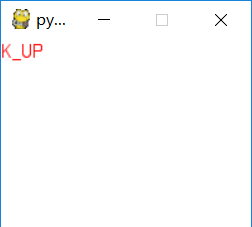
测试:

说明:

监控事件,当事件为键盘按下时,判断键盘按下的值是什么,并显示在屏幕表面上

处理鼠标事件

鼠标事件包括了鼠标移动,左键右键中键的监听,事件类型为 MOUSEMOTION,MOUSEBUTTONUP,MOUSEBUTTONDOWN 三种

属性 说明
type MOUSEMOTION,MOUSEBUTTONUP,MOUSEBUTTONDOWN
pos 鼠标位置
rel 相对位置

示例代码

1
2
3
4
5
6
7
8
9
10
11
12
13
14
15
16
17
18
19
20
21
22
23
24
25
26
27
28
29
30
31
32
33
34
35
36
37
38
39
40
41
42
43
44
45
46
47
48
49
import pygame 
from pygame import K_UP,K_DOWN,K_LEFT,K_RIGHT,QUIT,MOUSEMOTION,MOUSEBUTTONUP,MOUSEBUTTONDOWN

# 1. 先初始化游戏框架
pygame.init()
# 2. 创建一个窗口
screen = pygame.display.set_mode((300,150),0,32)
# 加载字体 (使用系统字体)
font = pygame.font.SysFont('arial', 16)
# 运行标志
running = True
# 案件方向
mouse = (0,0)
mouse_move = (0,0)
mouse_key = None
text = 'No Event'

# 1. 游戏死循环
while running:
# 2. 获取事件流
for event in pygame.event.get():
# 3. 处理事件流
if event.type == QUIT:
# 结束运行
running = False
elif event.type == MOUSEMOTION:
mouse = event.pos
mouse_move = event.rel
text = 'mouse pos %s rel %s ' % (str(mouse),str(mouse_move))
elif event.type == MOUSEBUTTONUP:
mouse = event.pos
mouse_key = event.button
text = 'mouse pos %s button %s' % (str(mouse),str(mouse_key))
elif event.type == MOUSEBUTTONDOWN:
mouse = event.pos
mouse_key = event.button
text = 'mouse pos %s button %s' % (str(mouse),str(mouse_key))

# 2.1 屏幕填充白色
screen.fill((0xff,0xff,0xff))
# 2.3 渲染文字
text_surface = font.render(text,True,(0xff,0,0))
# 2.4 贴图文字
screen.blit(text_surface,(0,0))
# 3. 刷新显示窗口
pygame.display.flip()

# 4. 退出框架
pygame.quit()

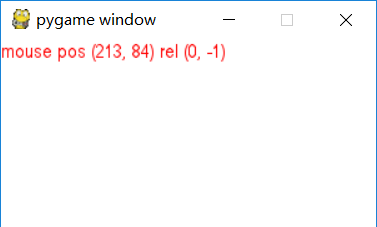
运行截图